COMMUNITY WIKI · OFFLINE SNAPSHOT
How to play MLP Card Game
Complete illustrated rulesSearch the offline wikiOfficial rules PDF · offline
1. Start a match
- Choose Play, select the two decks and Human vs AI, AI vs AI, or Local human vs human. LAN Play connects two offline apps on the same private network.
- Choose who moves first and a seed, or Randomize it. The same seed and decisions reproduce a match.
- Click Deal opening hands. Each player decides whether to keep the five-card hand or take their one whole-hand mulligan. If you mulligan, choose the bottom-deck order.
- Read the highlighted phase and the pending choice panel. Complete the current choice before another card or phase can resolve.
2. Know your deck
A constructed deck has 50 Main Deck cards (Characters, Events and Items), 15 Scenes, one Main Character, and four matching Story stages I–IV. Ordinary copy limits apply across alternate artwork; Everyday Scenes are the exception. Use Deck Creator’s validator before saving a playable custom deck.
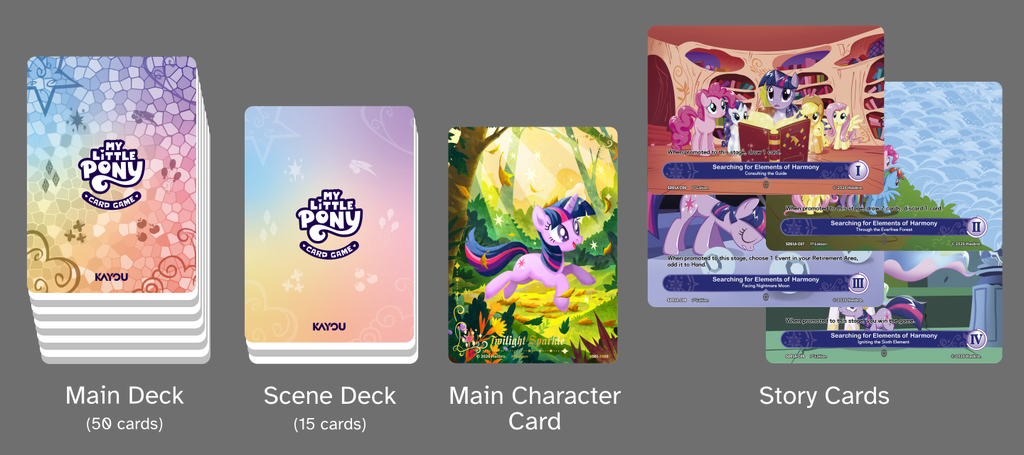
3. Read the two-player table
The Adventure Area has three opposing lanes. The landscape Story cards sit behind it; Scenes are below the Story. Main Character, Retirement, Scene Deck and Main Deck occupy the side areas. The rival’s mat is mirrored. Follow the lane highlight rather than reading an upside-down number as a different value.
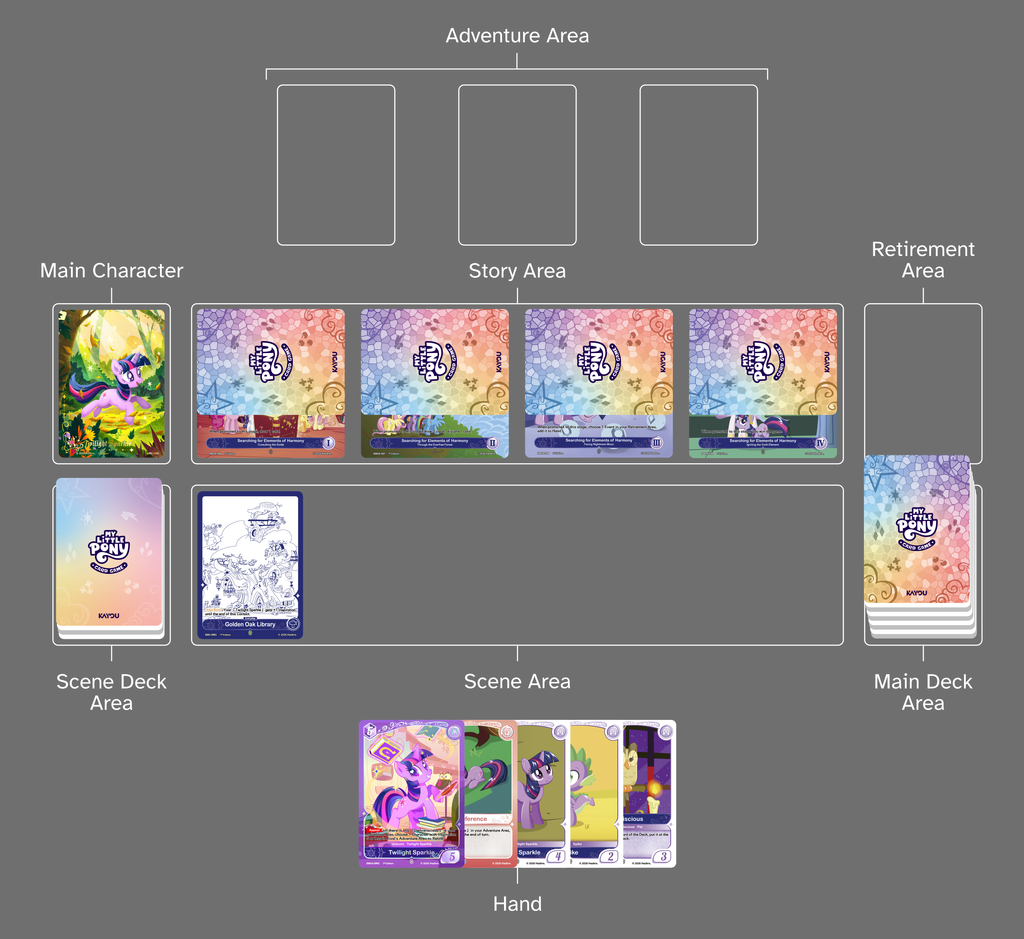
Plans are the hidden cards covering Story stages. Do not inspect them outside an allowed effect. Hands and decks are private. Cards in the Scene Area are public even when face down: inspecting one does not flip or untap it. Retirement is public and appears below the offline playfields.
4. Follow the four phases
Starting
Untap, draw the turn’s card, add the next Scene when available, and resolve start effects. The app handles required setup and records it in the log.
Main
Play cards, pay Harmony with untapped Scenes, and activate legal abilities. Use an empty Adventure slot for a Character, a legal Character for an Item, and the choice panel for targets or ordering.
Contact
Resolve lanes in the first mover’s Left–Center–Right order. Finish every boost, retirement, Farewell and Plan/Story choice before the next lane.
End
Turn-duration effects expire, end effects resolve, and the active player chooses discards down to ten cards. Then the other player starts.
5. Harmony is not Inspiration
Harmony is the play cost at the upper left. Inspiration is a Character’s Contact strength at the lower right. If a card does not print an attribute, the app hides it instead of displaying zero.
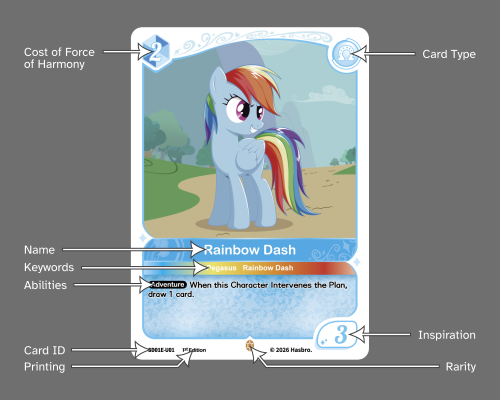
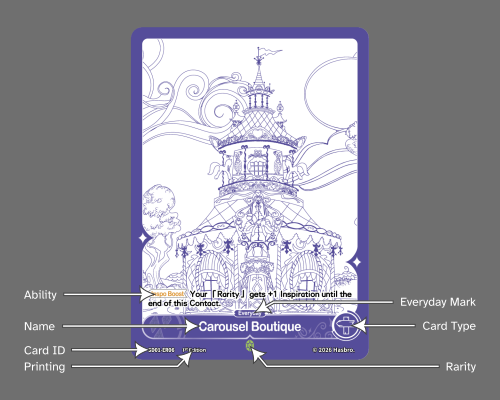
Tap an untapped Scene to pay one Harmony. Face-down Scenes can still pay. Turning a Scene face down for Inspo Boost is a different operation: the Scene must be face up, but can already be tapped. Check its printed target restrictions and duration. The included Carousel Boutique boosts Rarity only, until the end of that Contact.
6. Resolve a Contact
- Both lanes occupied: compare current Inspiration after the active player’s legal boosts, then the defender’s. Lower Inspiration retires; a tie retires both. Winning a contested lane does not also promote or intervene in that same Contact.
- Only the active Character: choose a legal promotion, intervene in the rival’s next Plan, or skip. A blocking Plan must be removed before the matching Story stage can be promoted.
- Only the defending Character, or both empty: no unopposed action for the defender.
- Plan revealed: resolve Pre-plan if printed, otherwise put that Plan card into its owner’s hand. Resolve each resulting choice before moving on.
Immediate win: reaching Story stage IV ends the game immediately. It does not wait for the remaining lane, End Phase, or the opponent’s next turn. Being required to draw from an empty Main Deck is also a loss. An empty deck alone is not yet a loss.
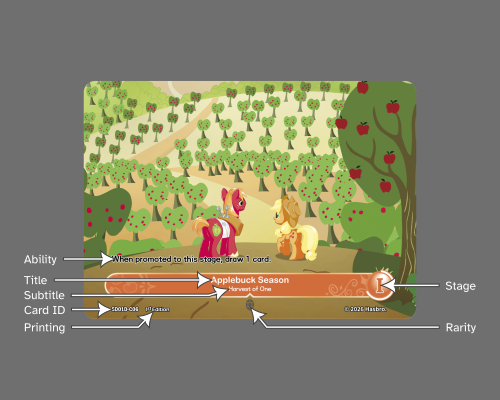
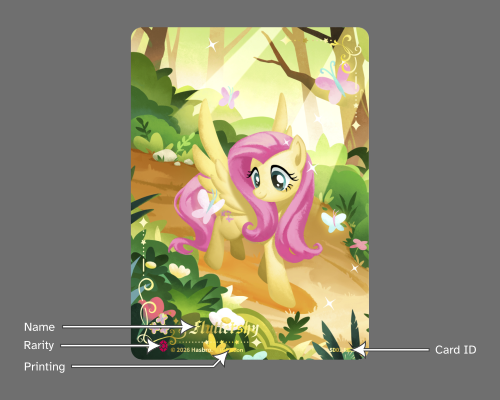
7. Events, Items and choices
Events resolve their effect and then retire. Select the exact legal targets; duplicate copies remain separate choices. Items adorn a legal Character. A Character can wear only one Item; a replacement retires the previous Item. The Item’s printed restrictions and continuous effects still apply.
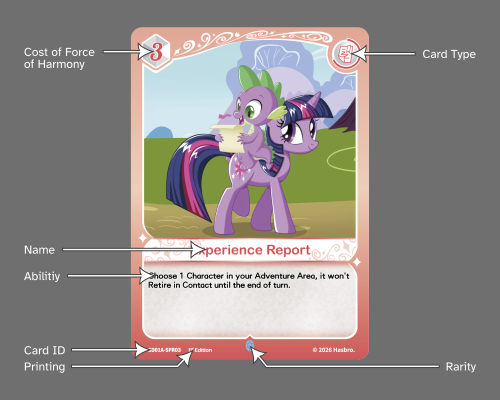
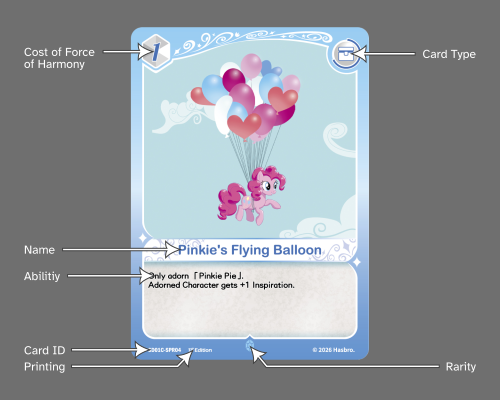
Appear resolves when the Character enters as instructed; Farewell resolves as part of leaving play; Adventure abilities are activated when legal; Pre-plan belongs to a revealed Plan. Humans and the computer resolve the same engine choice types. Use the log to check who acted and which card changed zones.
Nightmare Night: Treats
The 🍬 Treat marker means that Character currently has one Treat. A Character cannot hold two. Treats give no bonus by themselves: follow each card’s printed ability. Giving a second Treat does nothing and cannot trigger another placement bonus. “Has had a Treat” checks the current token, not its history.
Choose a legal Remove Treat ability to spend it. Some do not tap the Character; BP03 Rainbow Dash requires both tapping and spending. A Treat stays during movement between Adventure slots and through Resolution, then disappears silently when the Character leaves those areas. That cleanup is not a Remove Treat effect.
Square is Everyday and can exceed four copies. Market is limited to four copies across all artwork and gives a Treat during Contact instead of an automatic +1. Use BP03 in the Card Library or Deck Creator filter. The six Nightmare Night decks are custom showcases; the original starter lists remain unchanged.
Nightmare Night ability examples · 3.0.0
- Twilight Sparkle BP03-CR01: spend a Treat to recover an Event from Retirement, not draw from the deck. The AI saves the Treat if no Event is available.
- Fluttershy BP03-CR02: the chosen rival gets -2 Inspiration and Fluttershy gets +2 until End. Check the mirrored opposing lane; the AI evaluates both changes when selecting a target.
- Mayor Mare BP03-C16: tap to give Treats to up to two eligible Nightmare Night Characters. Fewer than two is allowed; a marked Character cannot hold a second Treat.
- Candy Bag: choose between its separate tap abilities for Inspiration or Treat placement. You cannot pay another tap cost with an already tapped Character.
- Rafting and Spike: Rafting draws after the retirement process, not instead of Farewell. End-phase hand-limit discards do not trigger Spike’s ordinary discard bonus.
- Plans: hidden cards stay private unless an effect allows a Look or reveal. A Character moved into a Plan loses its Treat silently.
The AI improvements are strategy choices, not extra restrictions on human players. App 3.0.0 does not change the official rulebook’s version number. Both LAN players must use the same app version.
Hearth’s Warming Eve: Presents and Explore
BP04 adds six kinds of Present. A 🎁 marker on a Character identifies its Present; click it to read the local token card. Multiple Presents remain separate tokens. They are not Items and do not belong in a deck.
At Upkeep, after the Starting Phase untap, draw and added Scene, choose which Presents to unwrap and their order. You may keep any or all of them. The active player declares first, then the rival; the rival’s chosen Presents resolve first. Follow the choice panel for revealed cards, recovery, targets and optional movement.
- Twilight: reveal two, keep one, put the rest on the bottom in your chosen order.
- Fluttershy: recover a retired Character costing 3 or less.
- Pinkie: its holder gets +1 Inspiration until End.
- Applejack: its holder gains a tap-to-untap-Scene ability until End.
- Rainbow: optionally move its holder to an empty friendly Slot.
- Rarity: give one rival Character −1 Inspiration until End.
Explore is a Main Phase Scene action. Turn down a face-up Explore Scene, choose a Character, then choose or unwrap its Present. Tapped face-up Scenes can Explore. Turning down does not tap a Scene or pay Harmony. ER01 and ER02 have Everyday; the four Explore Scenes have a four-copy limit including alternate art.
Presents stay during Adventure movement and retirement’s Resolution step, then disappear silently when their Character leaves Adventure/Resolution. This cleanup does not unwrap them. A Farewell transfer moves the selected Present before the remaining tokens are cleared.
Costs and conditions: fully pay tap, discard or Plan costs before an activated ability resolves. Paying a Plan cost does not trigger Pre-plan. Trixie’s Item requirement applies to her ability; it does not prevent playing Trixie. Ordinary effects may resolve as much as possible, even nothing; Explore and Inspo Boost require at least a performable part (rules 501.3 and 502.1.2).
The six Hearth’s Warming Eve decks are custom showcases, not official starter products. BP04 card faces and text come from KAYOU’s official English gallery. They are separate from the unchanged September community-wiki snapshot. The official rulebook remains v1.3.0.
Examples checked against the phone demo
- Opal: choose one friendly Rarity for +2 Inspiration until End. The other Rarity does not gain it, and Opal leaving does not erase the already resolved effect.
- Rarity’s Farewell: choose one eligible retired Event or Item, not a Character. Identical copies are still separate cards.
- Dress Form: the adorned Character gets +1 Inspiration during the rival’s turn, not during its own turn.
- Rarity Story III: recover one retired Rarity, then resume the remaining Contact lanes.
Playing the separate KAYOU phone demo
These controls are specific to the official demo, not the offline app. Tap the actual Scene card before playing. For a card drag, press its artwork center, hold briefly, drag into the slot, then release. A preview is not proof the card was played: confirm it left the hand and entered the slot. Click inside highlighted ability text, then select a legal target and confirm. With seven or more Scenes the phone demo opens an expanded Scene panel. The offline game uses explicit Play, payment and choice buttons instead.
Credits and source boundaries
The eight diagrams above are credited to Hope Starchild and labeled CC BY-SA 4.0 on their wiki file pages. The adapted guide is also CC BY-SA 4.0. Layout/navigation were adapted, and local image copies are used; underlying card art remains separately owned. The archived wiki also contains later sets, Chinese images and unofficial translations, clearly separate from this game’s English-only card database.
Full credits, contributors, archive scope and missing source images · Offline license text. My Little Pony © Hasbro. Cards and artwork © KAYOU. Unofficial app for personal use only; not for sale.